


12 Best International Travel Apps & Tools I Actually Use
Plan smarter. Travel easier. Stress less. Because vacation should not feel like a second job.
Listen. I love a good passport stamp. Give me a new city, beautiful architecture, good food, and an itinerary with a little adventure, and I'm a happy woman.
But you know what I don't love?
Standing in an airport after a nine-hour flight trying to figure out transportation. Booking accommodations only to discover they're nowhere near the attractions we want to visit. Or planning so many activities that everybody needs another vacation to recover from the vacation.
Ma'am. We're traveling, not competing on The Amazing Race.
Over the years, I've built a collection of travel apps and tools that help me plan smarter, stay organized, and navigate unfamiliar places with less stress.
And yes, artificial intelligence has officially joined the travel planning committee.
Whether you're planning your first international trip, organizing a family vacation, or trying to make your next adventure easier, these are 12 of the best international travel apps and tools I actually use, along with the lessons I've learned using them.
No random list of 37 apps you'll download and never open. Just practical tools that solve real travel problems.
Why I Use Travel Apps to Plan International Trips
International travel involves a lot of moving parts.
Flights. Accommodations. Airport transportation. Activities. Restaurant reservations. Getting around. Staying connected.
And if you're traveling with other people? Coordinating everybody's preferences.
That's a whole project management assignment.
While I love planning trips, I don't want to spend weeks jumping between websites, spreadsheets, screenshots, and group chats.
Technology helps me organize those moving parts.
For me, the best international travel apps do three things:
Save time: Help me research and compare options without starting from scratch.
Reduce stress: Make it easier to find information and navigate unfamiliar places.
Improve decisions: Help me choose accommodations, transportation, and experiences that work for the people traveling.
The important part isn't downloading every travel app available.
It's knowing which tools to use and when.
Best Travel Planning Apps to Use Before You Go

The secret to a smoother international trip often starts long before you reach the airport.
These are the travel planning apps I use to research flights, organize itineraries, find accommodations, and book experiences.
1. Claude: My AI Travel Planning Assistant
Best for: Personalized itineraries, organizing attractions, recommending neighborhoods, and planning around your travel group's needs.
Claude has become one of my favorite tools for AI travel planning.
But here's the thing.
I don't just open Claude and type, "Plan my vacation."
That's how you end up with an itinerary that has you visiting six museums, climbing three towers, and walking 25,000 steps before lunch.
Absolutely not.
Instead, I give Claude information about the trip and the people taking it.
Here's how I used Claude to plan a recent family trip.
First, I told it our travel dates.
Then I explained who was traveling: my husband, my sister Jane, my mother-in-law Mama Cookie, and me.
That detail was important because Mama Cookie is an older adult, and I wanted an itinerary that allowed us to experience the destination without wearing her out.
We needed to consider walking distances, transportation, rest breaks, and how many activities we could reasonably fit into a day.
Next, I gave Claude a wishlist of attractions and experiences we were interested in.
Then came one of my favorite parts.
Before choosing accommodations, I asked Claude to recommend neighborhoods based on where our activities were located.
Think about that.
Instead of booking a beautiful rental and later realizing that every attraction is 45 minutes away, I used our planned activities to help narrow down where we should stay.
Finally, I asked Claude to organize everything into a realistic day-by-day itinerary.
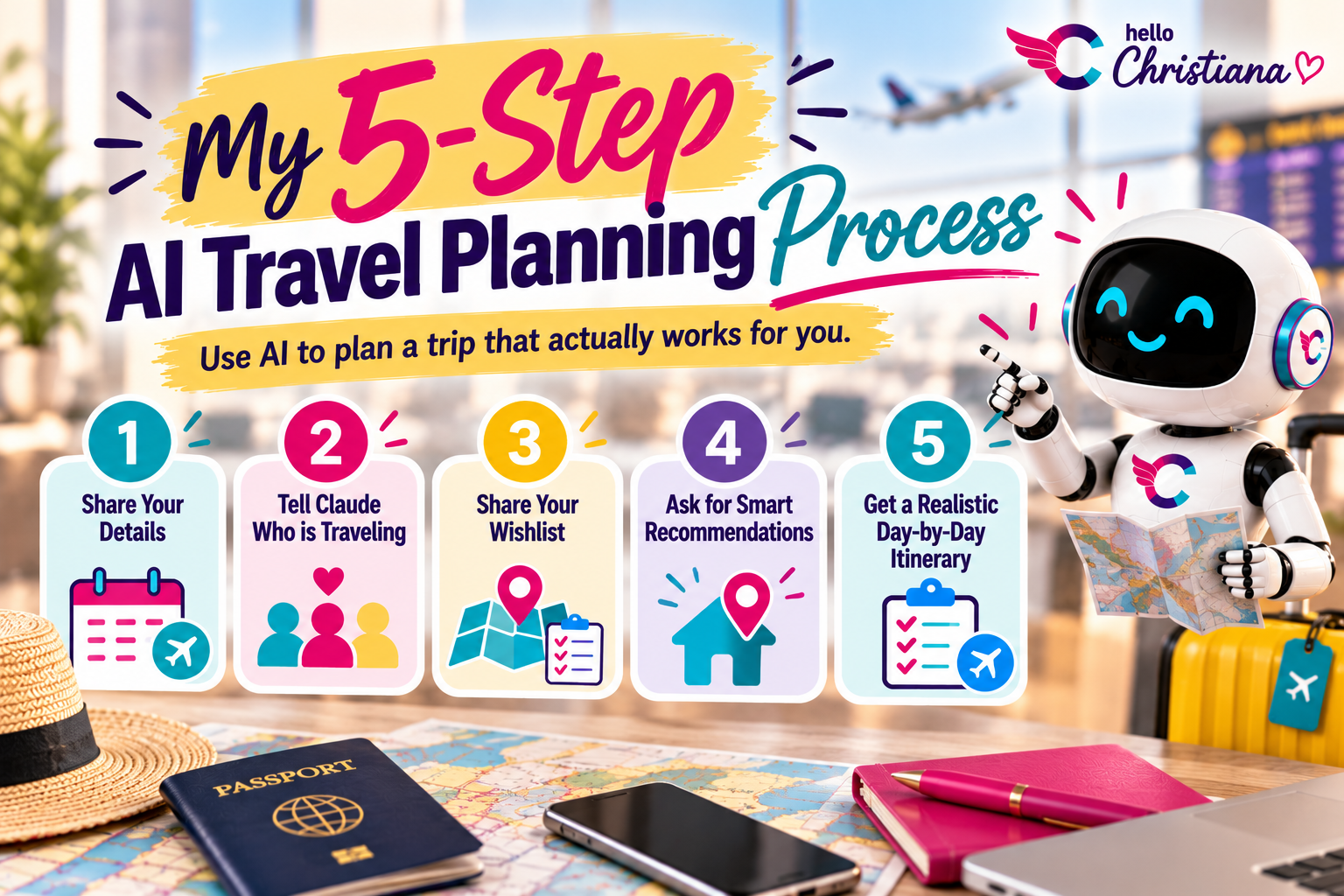
My five-step AI travel planning process:
Share your destination and travel dates.
Explain who's traveling, including relevant preferences and accessibility needs.
List the attractions and experiences you're interested in.
Ask AI to group activities by location and recommend convenient neighborhoods.
Request a day-by-day itinerary that includes transportation, meals, and downtime.
My travel tip: The more useful context you give AI, the more personalized its recommendations can be. Planning for a group traveling with grandparents is different from planning a romantic getaway or a girls' trip.
And remember, AI can make mistakes. Verify opening hours, travel times, prices, accessibility information, and reservations before booking anything.
New to AI or wondering why I chose Claude? I break down the differences between the major AI assistants in ChatGPT vs Claude vs Perplexity: Which One Is Actually Right for Your Business?. Although that guide focuses on business use, it will help you understand why different AI tools work better for different tasks.
2. Google Flights: Research Flights Before Booking
Best for: Comparing airlines, flight routes, dates, and prices.
Before booking international flights, I usually start with Google Flights.
It's one of my favorite ways to research available flights and compare options.
I can look at different airlines, routes, layover lengths, and prices without visiting every airline's website individually.
But here's my personal preference.
I research with Google Flights, then book directly with the airline.
Why?
Because when something goes wrong, such as a cancellation or schedule change, I'd rather deal directly with the airline instead of adding a third-party booking platform to the conversation.
That doesn't mean booking directly always guarantees better service or the lowest price. It's simply the approach I prefer.
My travel tip: Don't choose flights based on price alone. Pay attention to baggage fees, layover duration, airport changes, and arrival times.
A cheap flight isn't necessarily a bargain if it comes with an overnight layover, three connections, and a baggage fee that requires its own payment plan.
3. Airbnb: Finding the Right Place to Stay
Best for: Rental properties, family trips, and group accommodations.
I've used Airbnb multiple times to book rental properties.
When traveling with family or a group, I often appreciate having access to an entire property rather than booking multiple hotel rooms.
Depending on the rental, you may get separate bedrooms, a kitchen, shared living spaces, and enough room for everyone to spread out.
But I don't book accommodations just because the photos look beautiful.
Remember that Claude itinerary we discussed?
That's where the planning comes together.
Once I know which neighborhoods make sense for our activities, I can focus my Airbnb search on those locations.
Because a gorgeous rental loses some of its charm when you realize you're spending two hours every day getting to the places you actually came to see.
My travel tip: Check the total cost, cancellation policy, recent reviews, transportation access, and exact location.
If you're traveling with older adults or people with mobility needs, also verify stairs, elevators, entrances, and bathroom accessibility directly with the host.
Don't assume a listing is accessible just because it looks convenient.
4. Tripadvisor: My Go-To for Tours and Activities
Best for: Discovering attractions, researching experiences, reading reviews, and booking tours.
Tripadvisor has been one of my go-to travel platforms for years.
I use it to research attractions, compare experiences, and explore guided tours.
I also check for discounts because why pay more than necessary?
During a recent trip to Spain, I used Tripadvisor to book a guided tour of Madrid's Royal Palace.
But one thing I've learned is that the overall star rating doesn't tell the entire story.
Read the actual reviews.
Pay attention to comments about the guide, meeting location, group size, walking requirements, and whether the experience matched what was advertised.
My travel tip: Before booking a tour, confirm whether attraction admission is included, where you're supposed to meet, and how early you need to arrive.
Nobody wants to be standing in the wrong plaza at 8:55 a.m. wondering whether the tour guide has abandoned them.
5. GetYourGuide: Compare Tour Times Before Booking
Best for: Finding guided experiences and comparing activity availability.
Although Tripadvisor is usually my first stop, I also check GetYourGuide.
On my recent trip, I booked one activity through GetYourGuide because it offered the time I wanted.
And that illustrates an important travel planning lesson.
Don't automatically book with the first platform you check.
Sometimes the deciding factor isn't the price. It's whether the activity fits into your itinerary.
A tour offered at 10 a.m. might work beautifully, while the same experience at 3 p.m. could throw off your entire day.
My travel tip: Compare tour duration, included activities, cancellation policies, meeting locations, and available time slots.
Two experiences with similar titles aren't necessarily identical.
6. Booking.com: Arranging Airport Transportation
Best for: Exploring accommodation options and booking airport transfers where available.
Here's a little plot twist.
My first time using Booking.com wasn't to book a hotel.
It was to arrange airport transportation.
I chose the service because the booking information said the driver would be waiting inside the airport arrivals area.
And after a long international flight, that sounded wonderful.
No trying to find the taxi stand. No figuring out where a rideshare pickup zone is located. No coordinating multiple people and their luggage while everyone is tired.
Sometimes convenience matters more than finding the absolute cheapest option.
My travel tip: When booking airport transportation, confirm the meeting point, pickup instructions, luggage capacity, waiting-time policy, and what happens if your flight is delayed.
Also verify whether the driver tracks your flight automatically or expects you to provide updates.
Best International Travel Apps to Use Once You Arrive
Planning your trip is one thing.
Actually arriving in another country and figuring out how everything works?
That's a whole different adventure.
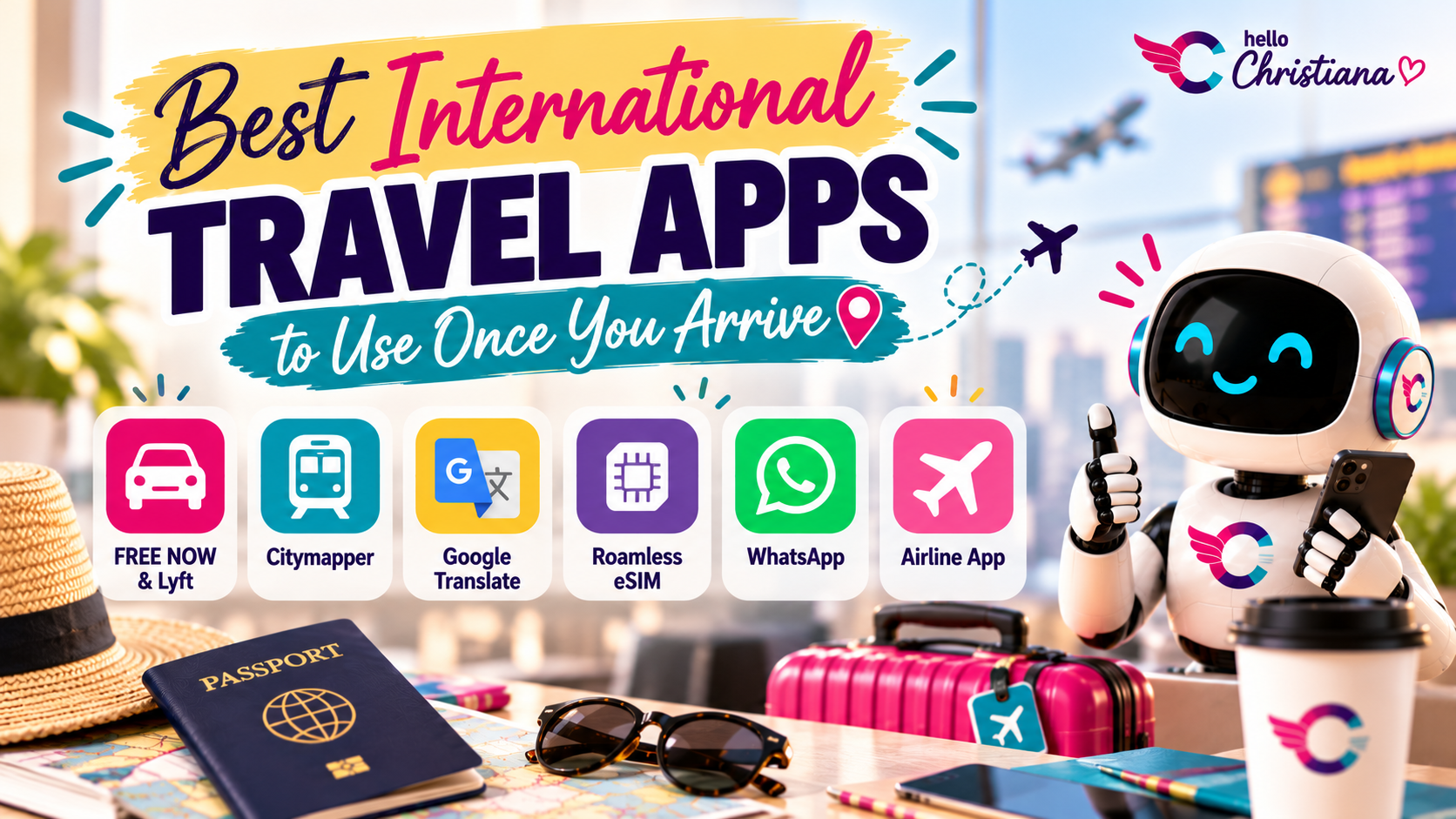
These are the apps I use to help with transportation, navigation, language barriers, communication, and staying connected.
7. FREE NOW and Lyft: Finding Transportation
Best for: Booking available rides and comparing transportation options in supported destinations.
A lot of people automatically think of Uber when they travel.
But Uber isn't necessarily the only option everywhere you go.
During my Spain trip, I used FREE NOW and Lyft instead.
FREE NOW is a transportation platform available in supported European markets.
Lyft's services and coverage vary by destination, so always check what's actually available where you're traveling.
My travel tip: Before leaving home, research which transportation apps operate at your destination.
Check estimated fares, payment methods, pickup locations, and whether the service offers licensed taxis or private rides.
Because standing outside an unfamiliar airport trying to download five different transportation apps is not the welcome ceremony anyone requested.
8. Citymapper: Navigating an Unfamiliar City
Best for: Comparing public transportation routes and navigating supported cities.
Citymapper is one of those apps that can make getting around a new city less intimidating.
Depending on the destination, it can help you compare routes involving trains, buses, walking, and other transportation options.
I like having a way to understand the journey before committing to a route.
Especially when traveling with other people.
My travel tip: Don't just compare travel time. Consider walking distances, transfers, stairs, and how much energy the journey requires.
A route that's technically five minutes faster may not be the best option if it involves three transfers and a long uphill walk.
9. Google Translate: Handling Language Barriers
Best for: Translating signs, menus, text, and everyday conversations.
Listen. I love exploring different cultures.
But I am not about to pretend I speak every language on the planet.
That's where Google Translate comes in.
It can help with everyday travel situations, whether you're trying to understand a restaurant menu, read a sign, or ask a basic question.
Depending on your device and language, you may also be able to download offline translation packs.
My travel tip: Download supported languages before your trip so you have some translation functionality even without mobile data.
And remember that machine translations aren't always accurate. For important medical, legal, or safety-related communication, use qualified assistance when necessary.
10. Roamless: Staying Connected With an International eSIM
Best for: Mobile data access while traveling abroad on compatible devices.
Let's discuss one of the most important international travel questions.
How are we getting internet access?
Because trying to navigate an unfamiliar city with no data connection is not the adventure I'm looking for.
Roamless is an eSIM service I've used for international connectivity.
An eSIM lets compatible devices access supported mobile plans without physically swapping SIM cards.
Depending on your destination and plan, it can be a convenient alternative to relying entirely on your regular carrier's international roaming service.
My travel tip: Before traveling, verify that your phone supports eSIMs, check whether it's carrier-unlocked, and compare coverage and pricing.
Also confirm whether the plan includes only mobile data or additional calling and texting features.
Not all eSIM plans work the same way.
11. WhatsApp: Keeping Your Travel Group Connected
Best for: Group messaging, sharing locations, and internet-based communication.
WhatsApp is one of those apps that becomes especially useful when traveling with other people.
Between airports, attractions, restaurants, and accommodations, there's a lot of information to keep track of.
A group chat makes it easier to share updates, meeting locations, photos, and important details.
My travel tip: Create a dedicated trip group before departure.
Share your accommodation address, important booking details, and emergency contacts so everyone knows where to find them.
And remember, WhatsApp messaging and calls require an internet connection.
12. Your Airline's App: Track Flights and Luggage
Best for: Flight notifications, boarding passes, itinerary changes, and baggage tracking where supported.
This one is easy to overlook because it isn't a single app.
It's whichever airline you're flying with.
During my recent international trip, I used the airline's app to track our flights and luggage.
Airline apps can provide useful information such as flight status, gate changes, boarding passes, and baggage updates, depending on the carrier.
My travel tip: Download your airline's app before departure and enable relevant flight notifications.
Also keep your booking reference and baggage claim receipts somewhere accessible.
Technology is helpful, but it's always smart to have a backup.
How I Use AI to Plan an International Travel Itinerary
Now that we've covered the apps, let's return to the tool that helps me bring everything together.
Claude.
Because the real magic isn't asking AI to produce a list of attractions.
It's using AI to organize a trip around your priorities.
For example, when planning a trip with Mama Cookie, I wanted us to see interesting places without exhausting her.
So I gave Claude the travel dates, information about our group, and the attractions we were considering.
Then I asked it to identify convenient neighborhoods and organize the activities into a day-by-day itinerary.
That's a much more useful approach than planning each day randomly.
And you can apply the same process whether you're traveling with children, grandparents, friends, or by yourself.
The key is giving AI enough context to understand what a successful trip looks like for you.
If you're just getting started with AI, I recommend reading my guide, 5 Things You Need to Know Before Using AI for Your Business. The same lessons about writing clear instructions, choosing the right tools, and fact-checking AI outputs apply to travel planning, too.
Because AI can be a fantastic assistant.
But we're not letting it confidently send us to a museum that's closed on Tuesdays.
Copy-and-Paste AI Travel Planning Prompt
Want to try this yourself?
Here's a reusable prompt you can copy into Claude, ChatGPT, or another AI assistant.

Your AI Travel Planning Prompt
Act as my international travel planning assistant.
I'm planning a trip to [destination] from [travel dates].
Who's traveling: [Number of travelers, ages or age ranges, relationships, and relevant preferences]
Our wishlist: [List attractions, activities, restaurants, neighborhoods, and experiences we're interested in]
Travel considerations: [Budget, mobility needs, walking preferences, dietary restrictions, rest breaks, transportation preferences, and other important details]
Help me:
Organize our wishlist by location so we're not wasting time traveling back and forth.
Recommend the most convenient neighborhoods to stay in based on the attractions we want to visit.
Explain the advantages and disadvantages of each recommended neighborhood.
Create a realistic day-by-day itinerary that accounts for everyone's interests and energy levels.
Estimate travel times between attractions and suggest practical transportation options.
Include meal breaks, downtime, and flexibility.
Identify attractions that may require advance reservations.
Flag accessibility considerations and anything that needs to be verified.
Don't overload our schedule.
Prioritize convenience, realistic pacing, and enjoyable experiences over squeezing in as many activities as possible.
Clearly identify any recommendations that require verification, including opening hours, prices, transportation schedules, and accessibility information.
How to Get Better Results From Your AI Travel Planner
Here's something I want you to remember.
Your first AI response doesn't have to be your final itinerary.
Ask follow-up questions.
Tell it you want fewer activities.
Ask it to reduce walking distances.
Request restaurant suggestions near your planned attractions.
Have it compare two neighborhoods before you choose accommodations.
That's how you turn a generic itinerary into something that actually works for your trip.
And if you're wondering what makes a good AI prompt in the first place, visit my AI Frequently Asked Questions page. I explain how to write clearer prompts and get more useful responses without needing a technical background.
One important privacy tip: you don't need to share passport numbers, booking confirmation codes, or other sensitive personal information with an AI assistant to plan a great trip.
Frequently Asked Questions About International Travel Apps
What apps should I download before traveling internationally?
Start with the apps that address your actual travel needs: your airline's app, accommodation booking information, navigation, translation, transportation, and mobile connectivity.
You may also find an AI assistant useful for organizing your itinerary.
You don't need every app on this list. Choose the ones that make sense for your destination.
Can AI really help plan an international trip?
Yes. AI tools such as Claude and ChatGPT can help organize travel ideas, group attractions by location, compare possible neighborhoods, and draft itineraries.
However, AI-generated information isn't always accurate or current. Verify important details before booking.
Is it better to book flights directly with airlines?
I personally prefer researching with Google Flights and booking directly with the airline.
Direct booking can simplify some customer-service situations, but policies, prices, and available support vary.
Compare your options before deciding.
Should I use Airbnb or a hotel for international travel?
It depends on your group, budget, destination, and preferences.
Rental properties may offer more shared space and amenities, while hotels may provide services such as front desks, housekeeping, and luggage storage.
Compare total costs, location, accessibility, and cancellation policies.
Do I need an eSIM when traveling internationally?
Not necessarily.
Your regular mobile carrier may offer an international roaming plan that meets your needs.
An eSIM is another option worth comparing if your device is compatible and the provider offers suitable coverage.
What's the best way to plan an international trip with older parents or relatives?
Start by understanding their preferences, mobility needs, and comfort levels.
Choose convenient accommodations, avoid overloading the itinerary, consider transportation carefully, and allow time for rest.
You can use AI to organize those requirements, but confirm accessibility details directly with accommodations and attractions.
Can I use ChatGPT instead of Claude to plan my trip?
Absolutely.
Both can help you brainstorm destinations, organize attractions, compare itinerary options, and build a travel schedule.
The best choice depends on which tool you prefer and the features available to you.
If you're trying to decide which AI assistant to start with, my ChatGPT vs Claude vs Perplexity comparison can help you understand their different strengths.
Final Thoughts: Travel Smarter, Not Harder
Here's what I've learned from planning international trips.
You don't need to download every travel app on the internet.
You need a few reliable tools that help you solve the problems you're actually going to encounter.
For me, that means using Claude to plan an itinerary around my travel group, Google Flights to research airfare, Airbnb to find accommodations, Tripadvisor and GetYourGuide to compare experiences, and other apps to help with transportation, navigation, communication, and connectivity.
But here's the bigger lesson.
Technology should make travel easier, not more complicated.
The goal isn't to spend your entire vacation staring at your phone.
It's to handle more of the logistics so you can spend less time worrying about the details and more time enjoying the experience.
And that's really what I love about practical AI and technology. Whether you're planning an international vacation or managing everyday tasks, the right tools can help you spend less time on busywork.
If you'd like more examples of putting technology to work in real life, explore my AI Made Simple resource library.
Because the best part of international travel isn't the apps.
It's the memories you get to make once you put the phone away.
Now go collect those passport stamps.
And please, leave some room in the itinerary for a nap.

Want to Keep Learning?
Enjoyed seeing how I use AI and technology to make international travel easier?
At HelloChristiana, I make technology easier to understand and more practical to use, without the confusing jargon.
AI Made Simple Resources
Explore beginner-friendly tutorials, practical AI tools, and step-by-step guides that help you use technology more confidently.
AI Made Simple Weekly and AI Literacy Bootcamp
Want to go beyond reading about AI and actually learn how to use it? Explore my hands-on training opportunities, designed for people who want practical skills without the technical overwhelm.
More From Making Tech Make Sense
Looking for more practical tips, real-world examples, and technology explained in plain English?
Making tech make sense, one practical tip at a time.